
Short answer
Put break-inside: avoid on the tr, not on the table. Keep the old page-break-inside alias next to it.
tr { break-inside: avoid; page-break-inside: avoid;}- Before the rule
- 4 pages with 2 rows cut in half (rows 17 and 49) on a plain 60-row table
- After the rule
- 0 rows cut
- Tested in
- Chrome 155 through Puppeteer 25.14 and Chromium 156 through Playwright 1.64, same numbers
- Not tested
- wkhtmltopdf, WeasyPrint or Prince
Then print normally. Nothing else in the print call matters for this:
async function printTo(page, pdfPath) { await page.pdf({ path: pdfPath, format: 'A4', printBackground: true, margin: { top: '15mm', bottom: '15mm', left: '12mm', right: '12mm' }, });}Here is the page break on the test table, before and after:
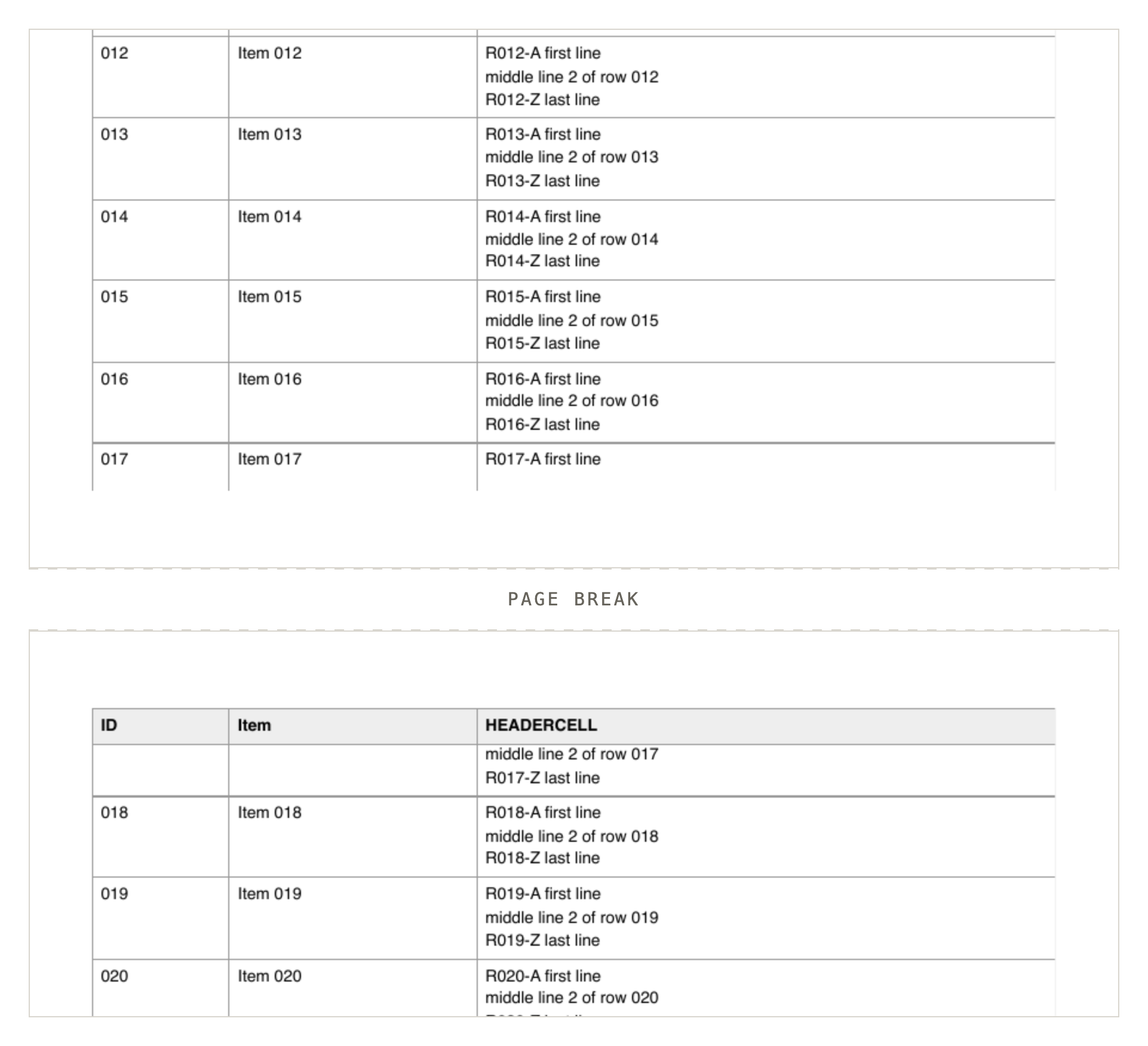
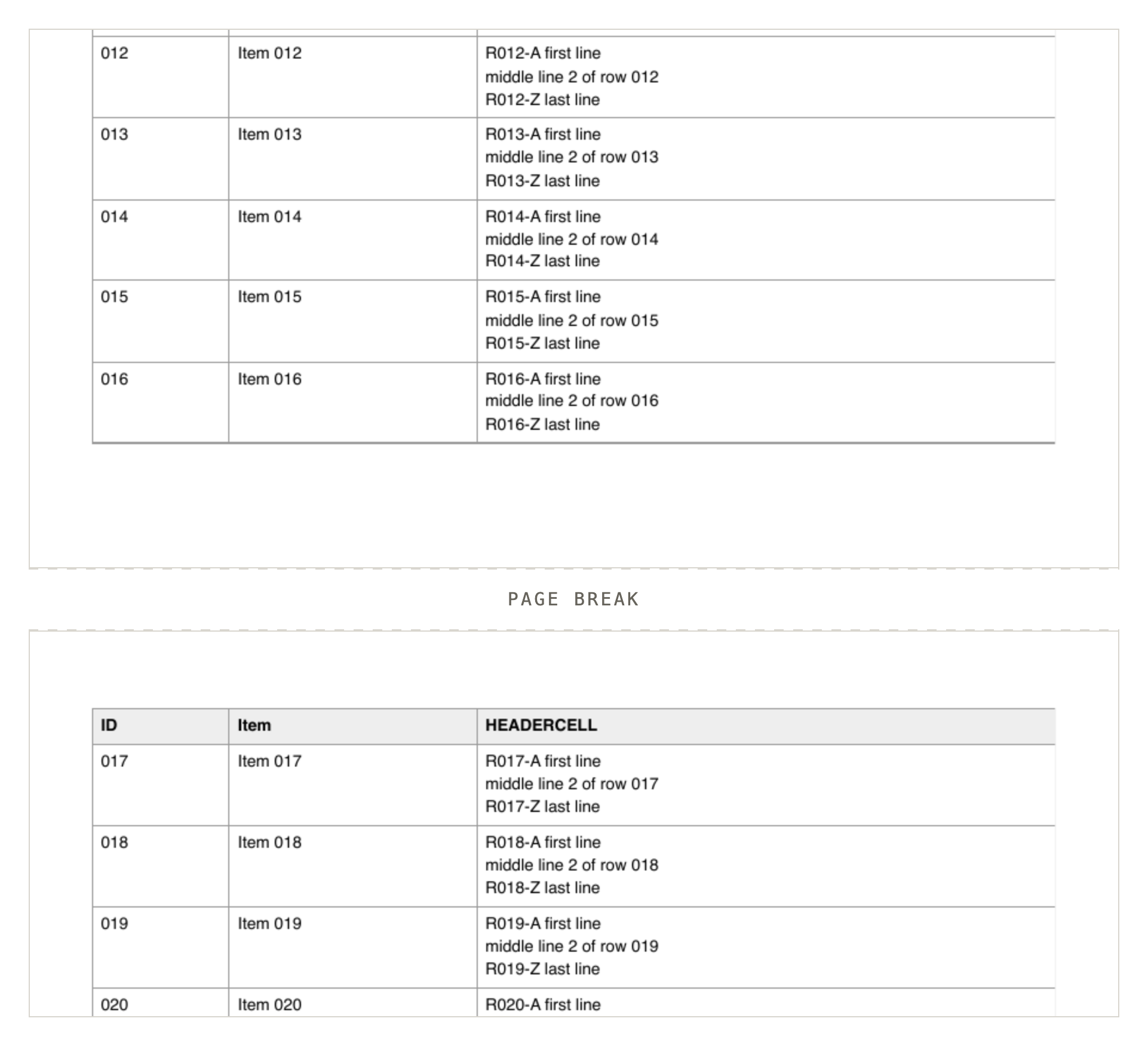
break-inside: avoid on tr, same table and browser: R017 starts on page 2.How do you know it's zero?
Every row carries a marker on its first and last line; a row is split when the two markers land on different pages.
Pages on this topic tell you it works. I wanted a number. Every row in my test table has a marker on its first line (R017-A) and one on its last (R017-Z). Print, ask pdftotext for each page, and a row is split when its two markers sit on different pages.
import { execFileSync } from 'node:child_process'; const pdf = process.argv[2];const info = execFileSync('pdfinfo', [pdf]).toString();const pageCount = Number(/Pages:\s+(\d+)/.exec(info)[1]); const where = {};for (const n of Array.from({ length: pageCount }, (_, i) => i + 1)) { const text = execFileSync('pdftotext', ['-f', String(n), '-l', String(n), pdf, '-']).toString(); for (const m of text.matchAll(/R(\d{3})-([AZ])/g)) { (where[m[1]] ||= {})[m[2]] = n; }}const split = Object.keys(where).filter((id) => where[id].A !== where[id].Z);console.log(`${pdf.split('/').pop()}: ${pageCount} pages, ${Object.keys(where).length} rows, ${split.length} split ${split.join(',')}`);answer-plain-puppeteer.pdf: 4 pages, 60 rows, 2 split 017,049
answer-rule-puppeteer.pdf: 4 pages, 60 rows, 0 split
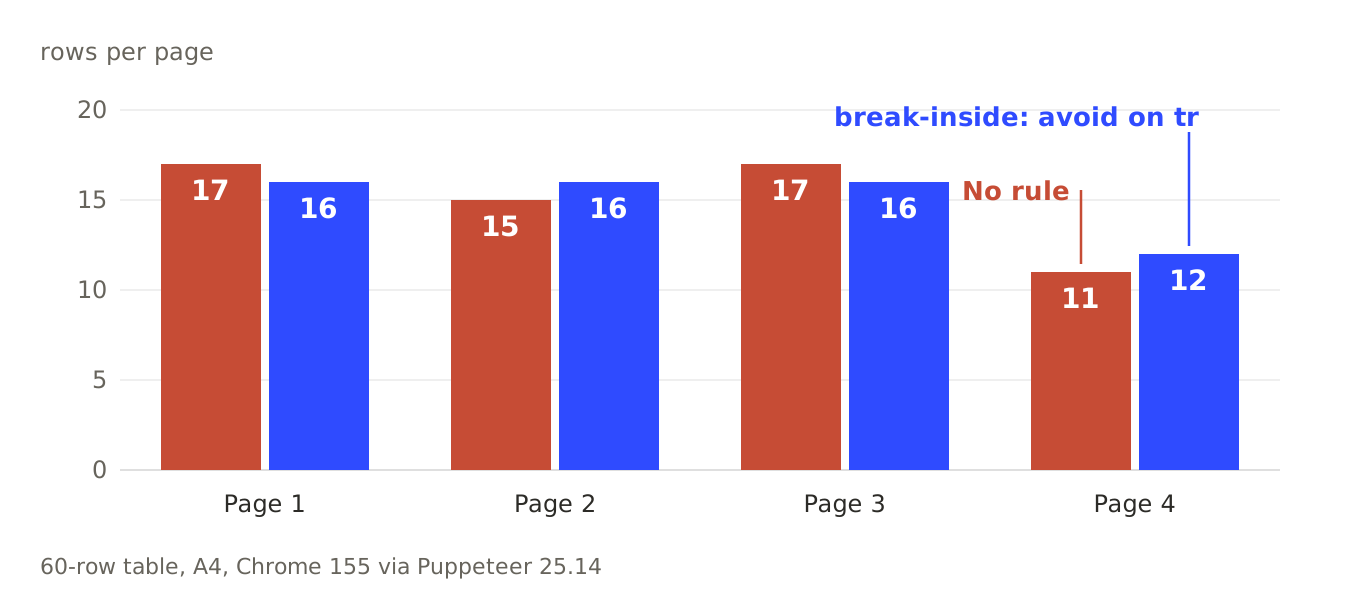
answer-rule-playwright.pdf: 4 pages, 60 rows, 0 splitThe rule costs almost nothing. Rows per page went from 17/15/17/11 to 16/16/16/12. It holds on Letter, with zero margin, and with 30 mm margins: on 120 rows I got 4 or 5 split rows without the rule and 0 with it, in every case, in both engines.
Why not put it on the table?
This is the version people reach for first, and it's the one that goes wrong. I put a 28-line intro above a 14-row table that would fit on one page. With the rule on the table, Chrome moved the entire table to page 2: 0 rows on page 1, 14 on page 2, and half a page of white space. With the rule on the rows: 8 rows on page 1, 6 on page 2.
Then a table that doesn't fit anywhere, 60 rows after the same intro. Chrome still pushed it to page 2, left page 1 empty, and still split 2 rows. You get the gap and the cut rows. On the plain table, a rule on tbody did nothing at all (2 split). A rule on td worked, which surprised me, but I would keep it on tr where people expect to find it.
| Rule on | What happened |
|---|---|
table, 14 rows after a 28-line intro |
Whole table moved to page 2: 0 rows on page 1, 14 on page 2 |
table, 60 rows after the same intro |
Pushed to page 2, page 1 left empty, still 2 split |
tr, 14 rows after the same intro |
8 rows on page 1, 6 on page 2 |
tbody, plain table |
Did nothing at all (2 split) |
td |
Worked |
Do flex, grid and overflow wrappers break it?
Not in my tests: with the rule, the overflow, flex and grid wrappers I tried split 0 rows in both engines.
The usual warning is that display tricks and overflow containers break this. I tried 200 rows in a table inside an overflow auto wrapper, overflow hidden, a flex wrapper, a grid wrapper, plus table and tbody set to display block. Without the rule they split 6 or 7 rows. With it, 0, in both engines, every one. And a tr set to display flex, grid or block gave 0 split rows even without the rule, so in those layouts I couldn't produce the problem to fix.
What about a row taller than the page?
Break rules are requests. I made row 30 of 60 taller than a page (300 lines in one cell). With the rule, Chrome started that row on a fresh page, 3 instead of 2, then split it across pages 3 to 8 anyway. The other 59 rows stayed whole: 1 split row where the unruled print had 3. The header repeated on all 10 pages. If your cells can hold unbounded text, cap it or accept the break.
Does the header repeat? And the footer?
I expected to need display: table-header-group. Not in these builds: a plain thead printed once per page on 4 of 4 pages, no CSS. What turns it off is display: table-row-group or display: block on the thead, or keeping your header row inside tbody (header on page 1 only in all three).
The surprise was tfoot. A totals row in a tfoot repeats at the bottom of every page, so my one footer line printed 4 times on a 4-page table. To keep it on the last page only:
tfoot { display: table-row-group;}0/0/0/1That gave 0/0/0/1 footers per page.
What about rowspan, orphans and widows?
With a first cell spanning two rows (50 pairs), the unruled print separated 3 pairs across a page boundary. With tr set to avoid, 0, and the table grew from 6 to 7 pages. Chrome treats the spanned rows as one unit.
Orphans and widows work on lines inside a cell, so they are a different tool. On 300 rows of 2 to 5 wrapped lines and no row rule, the defaults still left 2 rows split with one line stranded on the next page. Setting 1 and 1 left 7. Setting 4 and 4 left none, but only because no row had the 8 lines it would take to split. For rows, use the row rule.
Which print settings bite?
Two: an @page size is ignored without preferCSSPageSize: true, and printBackground: false drops background fills.
An @page size is ignored unless you pass preferCSSPageSize: true. With @page { size: A5 landscape } and format: 'A4' I got 842 by 596 points; with the flag, 595 by 420. And printBackground: false took my red header fill from 2,751 red pixels on page 1 to 0, so striped rows vanish.
The fixed-height case is why my checker prints the row count next to the split count. A zero in the split column is easy to get by losing the rows. Run it on your own PDF and make sure it says 60 rows before you believe the 0.
Sources
- MDN:
break-insideandpage-break-inside. - Puppeteer:
page.pdf()options, includingpreferCSSPageSizeandprintBackground. - Playwright:
page.pdf(). - pdftotext and pdfinfo (Poppler).