
In short
- pandas raises "This sheet is too large!" by comparing the DataFrame's shape to the limit. With XlsxWriter, a header row,
startrow, the index column or a chunked write can still push data off the edge of the sheet, with no error or warning. - Twelve chunks of 100,000 through one
ExcelWriterlost 151,425 rows on pandas 3.0.6 with XlsxWriter 3.2.9. - XlsxWriter returns -1 for each cell off the edge, and pandas never looks.
- A small wrapper that works out where the data will end before writing raised on every case in this article that overflowed.
I was writing a piece about Public Health England losing 15,841 Covid cases in 2020, because the files they were using were in the old XLS format and ran out of rows. I wanted to know if the Python tools we use now would do the same thing at Excel's current limit, which is 1,048,576 rows, and do it quietly.
So I wrote one row past the limit with a few libraries and counted how many rows actually ended up in each file. I didn't count by reading the file back with the library that wrote it, since that seemed like asking the suspect. An .xlsx is a zip file, the sheet lives at xl/worksheets/sheet1.xml inside it, and each row is a row element with an r="..." number on it. So I counted those.
pandas was the surprise, because pandas has a check. Give to_excel a DataFrame one row too big and it raises a ValueError that starts "This sheet is too large!"
Then I gave it a DataFrame of exactly 1,048,576 rows. That fits in Excel. But to_excel writes a header too, and the header goes in row 1, so the whole thing needs 1,048,577 rows. I knew about the check so I expected it to raise.
It saved the file. No error, no warning, and my count was one short.
My first guess was that my counting was off, so I opened the XML and looked. The last row is numbered 1048576, there are 1,048,576 of them, and the first one is the header. The last row of my data just isn't there.
If you want to see it yourself (it took a couple of minutes here, it's a big file):
import zipfileimport pandas as pd pd.DataFrame({"n": range(1, 1_048_577)}).to_excel("edge.xlsx", index=False) xml = zipfile.ZipFile("edge.xlsx").read("xl/worksheets/sheet1.xml")print(xml.count(b'row r="')) # 1048576, header included1048576The check is in pandas/io/formats/excel.py, and here it is:
num_rows, num_cols = self.df.shapeif num_rows > self.max_rows or num_cols > self.max_cols:So it's comparing the DataFrame's shape to the limit. 1,048,576 isn't greater than 1,048,576, the header shoves everything down one, and the bottom row falls off.
This was asked for in 2019
There's a pandas issue for this, #26051, opened on 11 April 2019 by someone called Pzoom522. to_excel was cutting off big sheets and "no error or warning is raised."
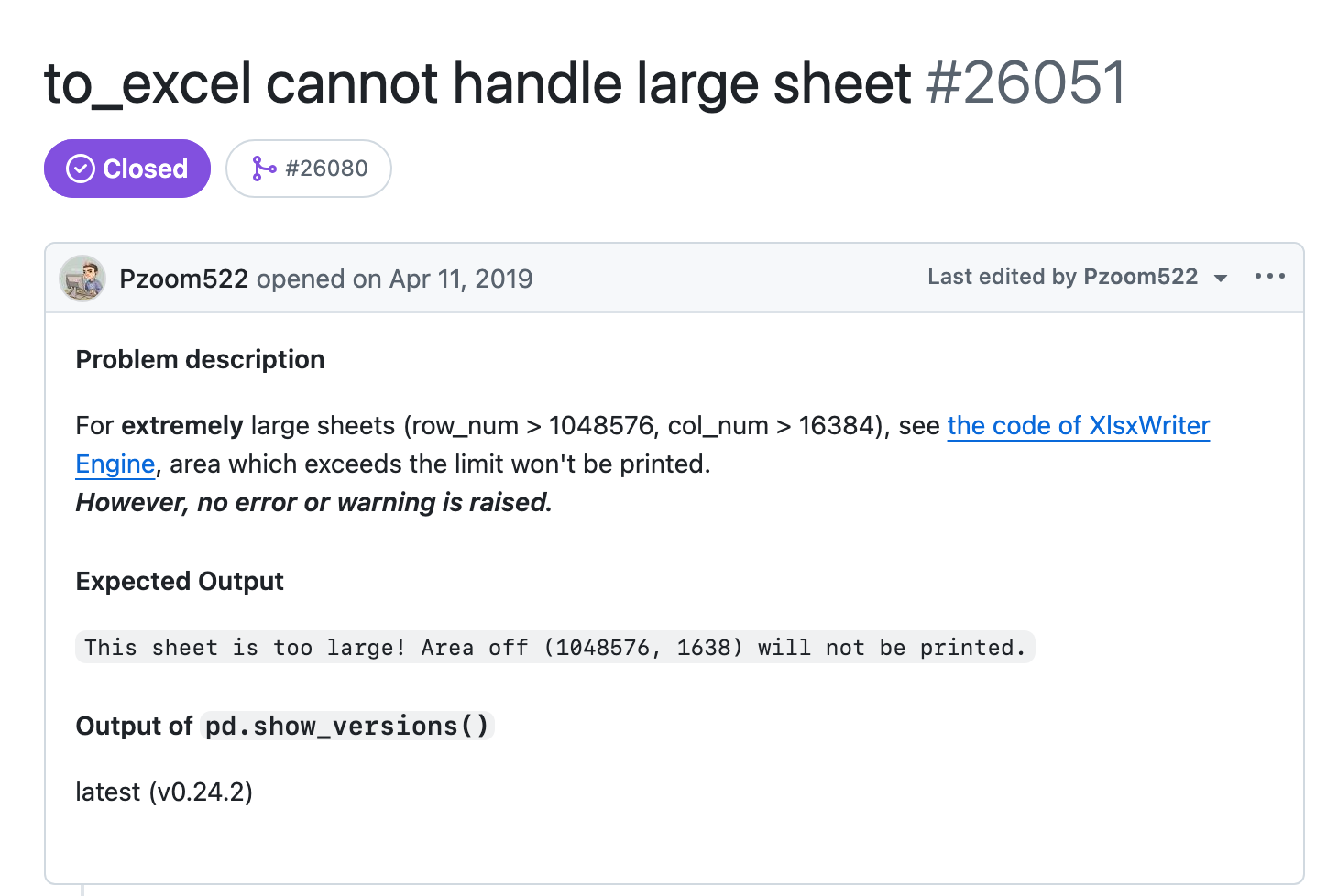
They'd also asked XlsxWriter, which is what pandas writes .xlsx with if you have it installed. John McNamara, who wrote XlsxWriter, turned it down. XlsxWriter returns -1 when you write a cell outside the sheet, it's documented, and:
From the record · XlsxWriter issue tracker
The current behaviour of a documented return value is the intended behaviour. Raising a warning for exceeding the Excel cell limits would just flood stderr with repeated warnings.
then "So I'm a no on this feature request. Sorry." Which, fair. Nobody wants a million warnings.
On the pandas side chris-b1 said "Because pandas know the total table size in advance, I think it makes sense to check and raise." PR #26080 added the check, it was merged in June 2019 and shipped in pandas 0.25 that July. The test for it uses 2**20 + 1 rows. One over.
Pzoom522 came back to that issue on 5 October 2020, the day after PHE's statement: "Had the UK's public health system seen this issue..." and a link to the BBC. (PHE's files were XLS and PHE never said what software made them, so pandas isn't in that story. It's just the same shape of problem.)
11 Apr 2019
Issue #26051 opened by Pzoom522
to_excelwas cutting off big sheets and "no error or warning is raised."June 2019
PR #26080 merged: pandas adds the check
The test for it uses
2**20 + 1rows. One over.July 2019
The check ships in pandas 0.25
5 Oct 2020
Pzoom522 comes back to the issue
The day after PHE's statement: "Had the UK's public health system seen this issue..." and a link to the BBC.
What else gets past it
If a header can sneak past the check, anything else that pushes the data down or to the right should too. I tried a few on pandas 3.0.6, which is current, with XlsxWriter 3.2.9:
startrow=100with 1,048,500 rows: lost 25 rows.- 16,384 columns with the index on, which is the default: lost the last column. The index took column A.
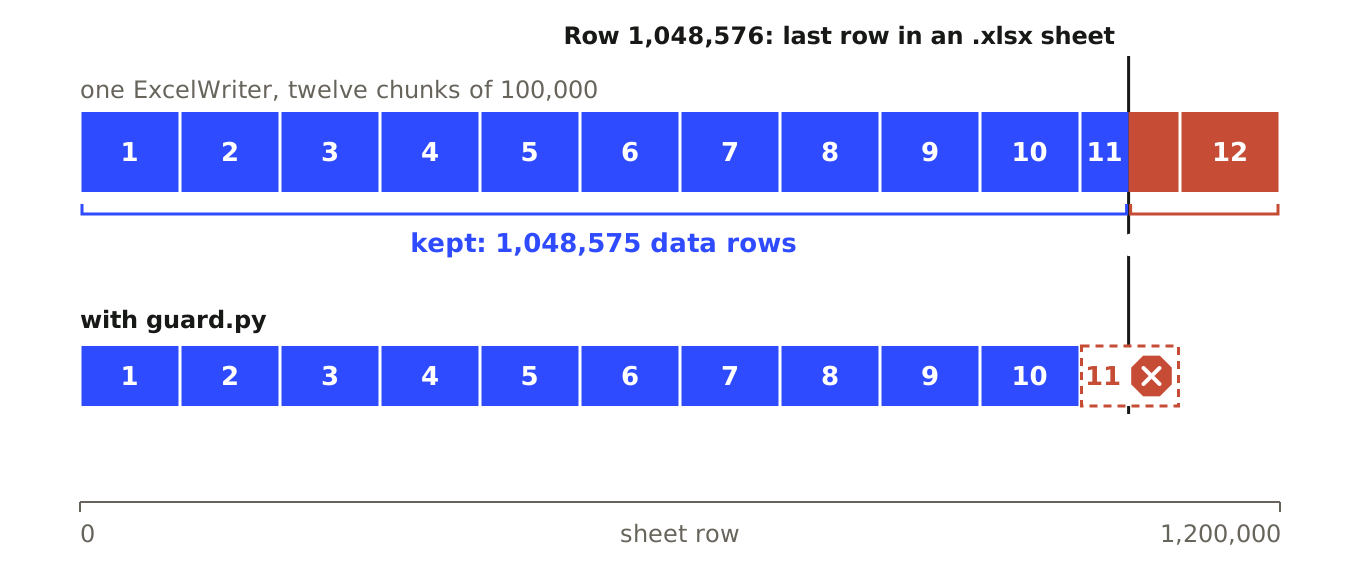
- 1.2 million rows, written to one sheet in twelve chunks of 100,000 through a single
ExcelWriter: lost 151,425 rows.
Not one error or warning in the lot.
The chunked one is the one that looks like a real export job. Every chunk is 100,000 rows, which is nowhere near the limit, so the check passes twelve times in a row:
import numpy as npimport pandas as pd path, sent = "chunks.xlsx", 0with pd.ExcelWriter(path, engine="xlsxwriter") as writer: for i in range(12): chunk = pd.DataFrame({"n": np.arange(sent + 1, sent + 100_001)}) chunk.to_excel(writer, sheet_name="data", index=False, header=(i == 0), startrow=0 if i == 0 else sent + 1) sent += 100_000n counts up from 1 so you can see where it stops. The file has 1,048,575 data rows and the last number in it is 1,048,575. The with block exits like nothing happened.
I also tried engine="openpyxl". The row cases do raise there, from openpyxl itself: "Row numbers must be between 1 and 1048576. Row number supplied was 1048577". But it wrote a 16,385th column into the file without a word.
The -1s
Over in pandas/io/excel/_xlsxwriter.py the actual write is:
wks.write(startrow + cell.row, startcol + cell.col, val, style)and the return value goes nowhere. So XlsxWriter does exactly what McNamara said it would, returns -1 for each cell off the edge, and pandas never looks.
The funny bit is a few lines under the size check in the same function. If you ask for an autofilter, pandas works out where the data ends so it can put the filter over it, startrow + num_rows + endrowsoffset, with the header rows in the offset. That's the sum the check would need. It's sitting right there, for the filter.
So I wrote that sum into a little wrapper, guard.py. Before it writes anything it works out where the data will end: startrow, plus the header rows, plus len(df), plus one more row if there's a MultiIndex header and the index is on, because pandas leaves a blank row under that kind of header. Same idea for columns. If the end is past the edge, it raises.
It raised on every case above that overflowed, and on the biggest version of each one that still fits it wrote every row. The chunked job gets ten chunks in and stops on the eleventh with:
ValueError: data would end at row 1,100,001, column 1I haven't filed a pandas issue about it.
Sources
- pandas issue #26051, opened 11 April 2019, with the 5 October 2020 comment.
- XlsxWriter issue #620, John McNamara declining the warning request.
- pandas PR #26080, the size check and its
2**20 + 1test. pandas/io/formats/excel.pyandpandas/io/excel/_xlsxwriter.pyat pandas 3.0.6.- PHE statement on delayed reporting of COVID-19 cases, GOV.UK.
- BBC News: the article linked from the issue.