
Your Placeholder Is Split Across Three Runs. That's Why python-docx Loses the Formatting
A tested function that replaces placeholders split across runs, inside hyperlinks, text boxes, nested tables and every header and footer, scored against the usual Stack Overflow answers.
The short answer
Don't assign paragraph.text. It rebuilds the paragraph as one plain run, so every bold, italic and font change in it is gone. Don't loop over paragraph.runs looking for the placeholder either, because Word often splits {{client_name}} into three or four runs. Join the paragraph's text, find the placeholder, then put the value into the piece where it starts and blank the rest:
import refrom docx.oxml import OxmlElementfrom docx.oxml.ns import qn W_P, W_T = qn("w:p"), qn("w:t")PRESERVE = qn("xml:space")PATTERN = re.compile(r"\{\{(\w+)\}\}") def set_text(t, text): t.text = text t.set(PRESERVE, "preserve") # keep leading and trailing spaces def write(t, text): # a newline in the value becomes a line break inside the same run first, *rest = text.split("\n") set_text(t, first) for line in rest: br, new_t = OxmlElement("w:br"), OxmlElement("w:t") set_text(new_t, line) t.addnext(br) br.addnext(new_t) t = new_t def replace_in_paragraph(p, values): # every w:t of this paragraph, including ones inside hyperlinks, # but not the ones in a text box's own paragraphs ts = [t for t in p.iter(W_T) if next(t.iterancestors(W_P)) is p] text = "".join(t.text or "" for t in ts) for m in reversed(list(PATTERN.finditer(text))): key = m.group(1) if key not in values: continue pos, first = 0, True for t in ts: start, end = pos, pos + len(t.text or "") pos = end if end > m.start() and m.end() > start: # this w:t holds part of the match a, b = max(m.start(), start) - start, min(m.end(), end) - start if first: write(t, t.text[:a] + str(values[key]) + t.text[b:]) first = False else: set_text(t, t.text[:a] + t.text[b:]) def replace_placeholders(doc, values): roots = [doc.element.body] for part in doc.part.package.iter_parts(): if part.partname.startswith(("/word/header", "/word/footer")): roots.append(part.element) for root in roots: for p in root.iter(W_P): # body, tables, text boxes, headers, footers replace_in_paragraph(p, values)Save the function as docx_replace.py and call it like this:
from docx import Documentfrom docx_replace import replace_placeholders doc = Document("template.docx")replace_placeholders(doc, { "client_name": "Smith & Sons Ltd", "start_date": "March 3, 2026", "end_date": "June 30, 2026",})doc.save("filled.docx")On my test template it filled all 13 paragraphs that had a placeholder, and each kept the formatting the placeholder had. I ran everything here with Python 3.13.5 and python-docx 1.2.0 on October 20, 2026.
The rest of this page is why the short answers you'll find don't do this, and the few things replace_placeholders still leaves alone.
The short answer
Don't assign paragraph.text. It rebuilds the paragraph as one plain run, so every bold, italic and font change in it is gone. Don't loop over paragraph.runs looking for the placeholder either, because Word often splits {{client_name}} into three or four runs. Join the paragraph's text, find the placeholder, then put the value into the piece where it starts and blank the rest:
import refrom docx.oxml import OxmlElementfrom docx.oxml.ns import qn W_P, W_T = qn("w:p"), qn("w:t")PRESERVE = qn("xml:space")PATTERN = re.compile(r"\{\{(\w+)\}\}") def set_text(t, text): t.text = text t.set(PRESERVE, "preserve") # keep leading and trailing spaces def write(t, text): # a newline in the value becomes a line break inside the same run first, *rest = text.split("\n") set_text(t, first) for line in rest: br, new_t = OxmlElement("w:br"), OxmlElement("w:t") set_text(new_t, line) t.addnext(br) br.addnext(new_t) t = new_t def replace_in_paragraph(p, values): # every w:t of this paragraph, including ones inside hyperlinks, # but not the ones in a text box's own paragraphs ts = [t for t in p.iter(W_T) if next(t.iterancestors(W_P)) is p] text = "".join(t.text or "" for t in ts) for m in reversed(list(PATTERN.finditer(text))): key = m.group(1) if key not in values: continue pos, first = 0, True for t in ts: start, end = pos, pos + len(t.text or "") pos = end if end > m.start() and m.end() > start: # this w:t holds part of the match a, b = max(m.start(), start) - start, min(m.end(), end) - start if first: write(t, t.text[:a] + str(values[key]) + t.text[b:]) first = False else: set_text(t, t.text[:a] + t.text[b:]) def replace_placeholders(doc, values): roots = [doc.element.body] for part in doc.part.package.iter_parts(): if part.partname.startswith(("/word/header", "/word/footer")): roots.append(part.element) for root in roots: for p in root.iter(W_P): # body, tables, text boxes, headers, footers replace_in_paragraph(p, values)from docx import Documentfrom docx_replace import replace_placeholders doc = Document("template.docx")replace_placeholders(doc, { "client_name": "Smith & Sons Ltd", "start_date": "March 3, 2026", "end_date": "June 30, 2026",})doc.save("filled.docx")What Word does to your placeholder
You typed Dear {{client_name}}, in Word and made the name bold. Here's what python-docx sees in that paragraph and the next one:
['Dear ', '{{', 'client_name', '}}', ',']
['This agreement starts on ', '{{start_date}}', ' and ends on ', '{{end', '_date}}', '.']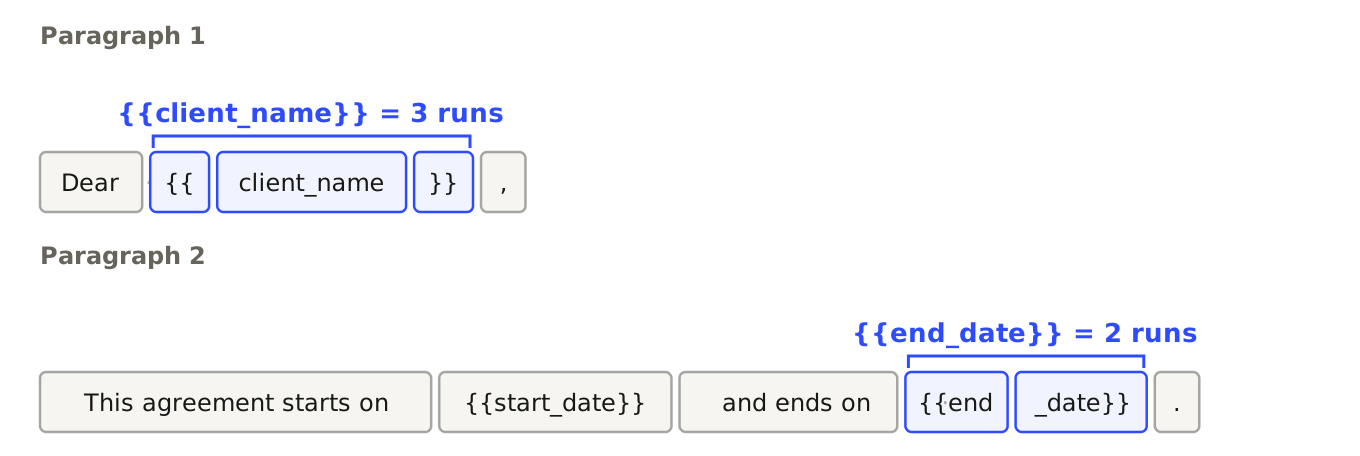
Word starts a new run every time formatting changes, and often when you edit the middle of a line later or spell check flags a word. You can't see the joins in Word, but "{{client_name}}" in run.text is false for every one of those runs.
Assigning paragraph.text gets the text right and loses everything else. After the swap both paragraphs were a single run with bold and italic set to None. The python-docx docs say it outright: assigning to text keeps paragraph style, but "all run-level formatting, such as bold or italic, is removed."
['Dear ', '{{', 'client_name', '}}', ',']
['This agreement starts on ', '{{start_date}}', ' and ends on ', '{{end', '_date}}', '.']
How the usual answers scored
I built one template with the cases real documents have: placeholders split over runs, one inside a hyperlink, one in a content control, a text box, a table, a table inside a table, the first-page header, the default header and a footer with a page number field. That's 13 paragraphs. I checked each one after filling for the right text and the right formatting.
| Code | Paragraphs right | Placeholders left |
|---|---|---|
Accepted answer, SO 24805671 (paragraph.text) |
1 of 13 | 7 |
| Accepted answer, SO 34779724 (loop over runs) | 2 of 13 | 11 |
| Answer 55733040 (first run gets the text) | 5 of 13 | 8 |
| Answer 67188730 (character mapping, headers too) | 7 of 13 | 6 |
| Maintainer's function from python-docx issue 30 | never finished | |
| docxtpl 0.20.2 | 13 of 13 | 0 |
replace_placeholders (this article) |
13 of 13 | 0 |
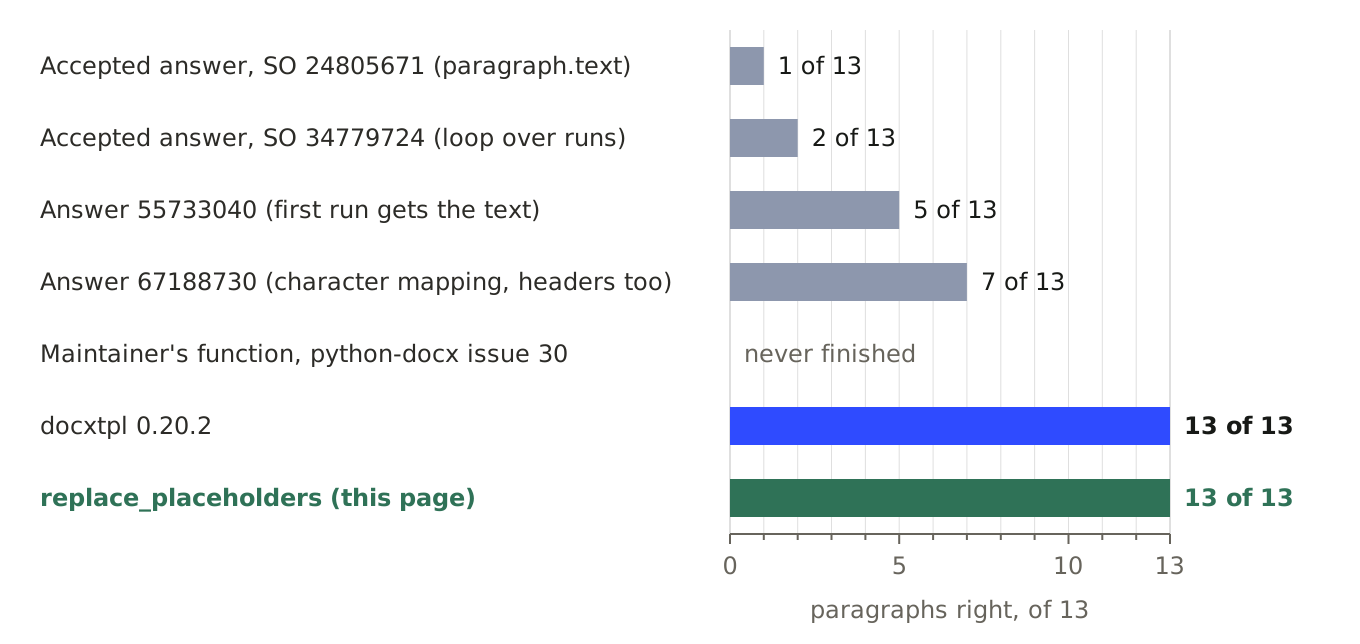
The answers with the right idea for split runs still lose points because they only look where doc.paragraphs and doc.tables look. That's the real gap.
Four places doc.paragraphs never looks
Hyperlinks. In the paragraph Portal: {{client_name}} portal, the placeholder is the link text. paragraph.text includes it. paragraph.runs returns only ['Portal: '], because the link's runs sit one level down inside a hyperlink element. The function from issue 30 searches paragraph.text, finds the match, edits the runs it can see, and searches again:
search 1: runs=['Portal: '] text='Portal: {{client_name}} portal'
search 2: runs=['X'] text='X{{client_name}} portal'
search 3: runs=['X'] text='X{{client_name}} portal'
search 4: runs=['X'] text='X{{client_name}} portal'
It never stops. On a copy of the template without the hyperlink it finished, with 8 of 12 right. My function finds text nodes with p.iter, which goes into hyperlinks and content controls.
Text boxes. Their paragraphs live inside a drawing in the body paragraph, so neither doc.paragraphs nor the table loop reaches them. The text box in my template also stores its text twice, a current copy and a VML fallback, the way Word writes them, so there are two placeholders to fill. Walking every paragraph element under the body catches both copies. The iterancestors check makes sure the outer paragraph doesn't also claim the text box's text.
Headers you didn't know you had. section.header is the default header only. If the template has "Different first page" turned on, page one uses section.first_page_header, and there's an even_page_header too. Answer 67188730 handles headers and still left {{client_name}} on page one. I skip the section API and take every header and footer part straight from the package, so there's nothing to forget.
Nested tables. A table in a table cell isn't in doc.tables. Code that loops rows and cells needs to recurse. root.iter gets there without asking.
search 1: runs=['Portal: '] text='Portal: {{client_name}} portal'
search 2: runs=['X'] text='X{{client_name}} portal'
search 3: runs=['X'] text='X{{client_name}} portal'
search 4: runs=['X'] text='X{{client_name}} portal'
Whose formatting wins
The value takes the formatting of the run where the placeholder starts. I split one placeholder across a bold run and an italic run:
1 mixed formatting: [('Hi ', None, None), ('Ada', True, None), ('', None, True), ('!', None, None)]Ada came out bold, not italic. If you want a field styled a certain way, select the whole placeholder in Word, braces included, and format it once.
The runs after the first are left in place with no text in them.
The other edge cases I ran, each saved and reopened:
- A newline in the value (
10 Main Street\nSpringfield) became a line break inside the same bold run. - A value with spaces at both ends came back as
'[ x ]', which is what thexml:spaceline is for. {{a}}{{b}} and {{a}}in one run became122 and 1.- A value that looks like a placeholder isn't expanded again:
{{a}} {{b}}witha="{{b}}"gave'{{b}} B'. - A key you didn't pass stays as written, so
Ref: {{unused}}is unchanged.
1 mixed formatting: [('Hi ', None, None), ('Ada', True, None), ('', None, True), ('!', None, None)]Check the saved file for leftovers
The function covers the body, tables, text boxes, headers and footers. A .docx has more parts than that, and some hold text you typed into the template. After saving, I look for braces in every part of the zip:
import zipfile def leftovers(path): with zipfile.ZipFile(path) as z: return [name for name in z.namelist() if b"{{" in z.read(name)]before fixing metadata: ['docProps/core.xml', 'word/document.xml', 'word/_rels/document.xml.rels']On my template, after filling, it printed the output shown with the code. Each one is a different leftover:
docProps/core.xmlis the document title from the file's properties,Agreement for {{client_name}}. Set it withdoc.core_properties.title, and the check came back without it.word/document.xmlstill had{{unused}}, a key I never passed. That's the check doing its job.word/_rels/document.xml.relsholds the hyperlink's target,https://example.test/clients/{{client_id}}. Link addresses aren't document text, so no text replacement reaches them.
I didn't test footnotes, endnotes or comments. If your template uses them, this check will name the part.
import zipfile def leftovers(path): with zipfile.ZipFile(path) as z: return [name for name in z.namelist() if b"{{" in z.read(name)]before fixing metadata: ['docProps/core.xml', 'word/document.xml', 'word/_rels/document.xml.rels']When docxtpl is the better pick
If you can change the template's syntax, docxtpl fills Jinja tags in a .docx and handles split runs itself. It got 13 of 13 on the same template. Two things bit me:
- A key you don't pass renders as nothing, with no warning.
Reference: {{unused}}becameReference:. - With the default settings, a value containing
&breaks the XML.render({"client_name": "Smith & Sons"})raisedXMLSyntaxError: xmlParseEntityRef: no nameand wrote no file. Passautoescape=Truetorender.
I'd pick docxtpl when the template needs loops or conditions. For a contract with a dozen fixed fields, the function above is easier to debug, and a missing key shows up as a visible {{name}} instead of a blank.
The rule I'd keep
Sources
- Stack Overflow 24805671, the accepted answer that assigns
paragraph.text. - Stack Overflow 34779724, the accepted answer that loops over runs.
- Answer 55733040 and answer 67188730.
- python-docx issue 30, the maintainer's function.
- python-docx docs:
Paragraph.text. - docxtpl documentation.